
In This Guide
Sick of poor audio from your TV?
If you’re thinking of getting a soundbar, then we probably don’t need to tell you how disappointing the sound can be from even ‘good brand’ of flatscreen TV.
While screen quality and size has increased and improved in recent years, the same can’t be said about those tinny little things that pass for TV speakers. In this guide we’re looking at the budget(ish) priced Bose Solo 5 soundbar and how it can help bring some quality back to your TV’s audio.
The Bose Solo 5 is a wallet-friendly soundbar, by audio experts Bose. It’s got a compact size and offers a worthwhile upgrade to your current telly box’s underwhelming audio. It’s ideal for small to medium rooms and can also be used as a Bluetooth speaker.
Quick answer: the Bose Solo 5 is a good choice if you want a simple, compact soundbar that makes speech clearer and adds fuller sound with almost no setup. It doesn’t have HDMI or Dolby Atmos, so if you want those features, look at our best Bluetooth soundbar guide. Bose has released newer models since the Solo 5, such as the Solo Soundbar Series II, so check what’s currently on sale.

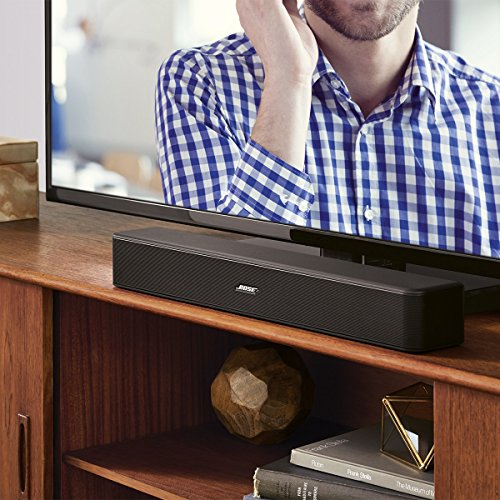
Above: Bose Solo 5 – Amazon UK
Today’s best prices on the Bose 5 Soundbar
What problems will this soundbar solve?
- Quiet, annoying dialogue – Arg! There’s nothing worse than not being able to hear what people on screen are saying, especially in quiet scenes. Ever reached for the remote and constantly had to adjust it to hear the dialogue? Yup, pretty frustrating! A good soundbar will solve this for you once and for all.
- Tinny sound with no BOOM in explosions – We make a lot out of image quality, pixel count and contrast with our TVs (rightly so!) But what about good old fashioned quality audio, eh? After all, your ears deserve some love too. A proper soundbar, like the Bose 5 one, will bring back some more of the audio magic you get at the cinema, and less pew pew from those tiny built in speakers.
- More volume, without distortion – Don’t be scared to turn your TV up a bit more now. It won’t buzz, distort, or sound like something’s going to POP.

Using your soundbar as a bluetooth speaker
If you haven’t already got a Bluetooth speaker in your living room, you’re going to be really pleased when your Bose 5 solo soundbar arrives. As well as boosting your TV’s audio, this soundbar can be used as a standalone speaker that can play tunes from your phone, thanks to Bluetooth. (The TV doesn’t need to be turned on to do this).
What inputs does the Solo 5 Soundbar have?
As well as being able to blast your favourite tunes from your phone using the Bluetooth connection, the Bose soundbar comes with the usual array of handy inputs on the rear.
- Optical in
- AUX in (for connecting pretty much anything)
- RCA
- Coaxial
What does this soundbar sound like, really?
This isn’t the most expensive soundbar on the market but, having said that, it is a Bose. And they don’t make poor quality audio as a device. The audio quality is detailed and loud!
No tweaking necessary
This is a good soundbar if you don’t want to mess around for hours getting the perfect sound. (You can do that, if that’s your thing!) But the sound settings ‘out of the box’ sound pretty good and most people will find it a huge improvement over their existing TV setup.
5 things you’ll love about the Bose Solo 5 Bar
- It’s got a compact size – Not everyone wants to wall-mount their Solo 5 soundbar (although it does look kinda cool!) If you’re looking for a sound bar that isn’t a space-hogging beast then you’ll probably like how compact the Bose one is. It can be slipped onto a shelf, or under the TV without being distracting. It’s also quite light (not that you’ll be waving it around!)
- It’s well designed – Lets be honest, it would be better if we didn’t have to have an extra black box sitting under the TV, and there’s not that much you can do with them. But, as far as black boxes go, it looks pretty good. The mat black looks decent enough and it’s not something you’ll want to hide out of the way. The typical amount of thought has gone into the design that we’d expect from ‘a Bose’.
- It’s easy to wall mount – The Bose 5 soundbar is a lot lighter than it looks. There”s also two standard connections around the back to make it easy to wall mount (you’ll need the ‘proper’ bracket). If you’re planning to go for this option, there’s usually some savings to be had in the form of a bracket and soundbar bundle.
- Good bass and volume for the size – The built in sub woofers do a good job of producing some decent low end sounds. You’re not going to be able to compete with soundbars costing 4x as much, or with having a separate woofer, but the bass here is good and blissfully distortion-free.
- The rest of the sound is clear and detailed – Coming from a regular TV speakers you’ll find the Bose 5 Soundbar is a pretty sharp step up. You’ll appreciate a level of detail in the sound, be it action scenes, or more sedate dramas, to be much more clear and easy to make out. You know – like they’re meant to be.
Impressive reviews on Amazon
The Bose 5 Soundbar has one of the highest number of positive reviews you’ll find. At the time of writing, there’s over 1000 reviews, and the average is around the 4.5 star mark. Not too shabby. One thing that you’ll notice is that Bose are massive on customer service, answering a bewildering number of questions. It’s nice to see manufacturers supporting their devices like this!
What you might not like about the Bose 5 Soundbar
Hey we like to keep it real at AudioPunch. It’s not all magical audio bliss with the Bose Soundbar. Here’s some stuff you might not like!
It comes with a power brick!
Yeah, you can stuff it down the back of the TV, and it’s probably not a deal-break for most people but you’d think there’d be some way to build this thing into the black box that is the actual soundbar. to that end you’ll also need another socket (we know, they’re in short supply!) But that’s something you’ll find with jut about all sound bars.
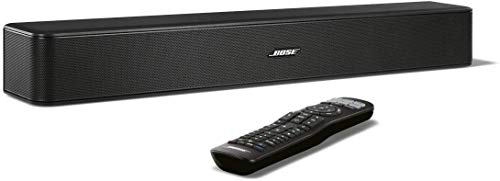
The remote control is BIG
You’re meant to use this remote to take over the job of your TV. After some re-programming you’ll only need one remote. But, if you’re like me, you might end up with another addition to the remote pile from hell in your living room.
It’s not an ideal choice for really large rooms
This is a compact sound bar and it’s also a lower-priced soundbar. If you’re looking for a massive, loud soundbar to fill a larger room, this might not be the one for you. While the audio will be a lot louder than what’s coming out of your TV now, you might want to stump up some more cash for a more suitably equipped soundbar.
How to set up the Bose Solo 5
Setup takes about ten minutes. You’ll need the soundbar, power adaptor, remote and one of the supplied cables.
- Place it centrally under the TV, or mount it on the wall. Make sure the front is clear.
- Connect the audio. Use the optical cable from your TV’s optical output to the soundbar’s optical input. If your TV doesn’t have optical, use the coaxial or 3.5mm aux cable with a matching TV output.
- Plug in the power and switch on. The soundbar will display its input.
- Set your TV’s audio output to “external speaker” or “optical”, and set the digital output format to PCM or Auto if the sound seems missing or odd.
- Turn off the TV’s own speakers, if it doesn’t do so automatically.
- Programme the remote so the volume buttons control the soundbar. See below.
Teaching the Solo 5 remote to control your TV
The Solo 5 has a universal remote that can also control your TV, so you only need one handset day to day. Exact steps are in the manual, but the process is: put the remote into learning mode, point it at your TV, and enter a code for your TV brand from the list supplied, or use the learning process to teach it the power and input buttons. Once done, the volume and mute buttons control the soundbar, and the power and input buttons control the TV. It’s worth spending a few minutes on, as it makes the soundbar far easier to live with.
Using the Bluetooth and dialogue modes
- Bluetooth: put the Solo 5 in pairing mode (hold the Bluetooth button until the light flashes), then select it on your phone. Once paired, it usually reconnects automatically when you switch on.
- Dialogue mode: a setting that lifts the centre of the sound, where voices sit, making speech clearer. It’s helpful for films with quiet or mumbled dialogue and for late night viewing.
- Bass control: the bass level can be adjusted on the remote if the soundbar is boomy on a shelf, or if you want more low end in a large room.
Troubleshooting the Solo 5
- No sound: check the TV’s audio output is set to optical or external speakers, the cable is fully seated, and the soundbar is on the correct input. Try setting the TV’s digital audio format to PCM.
- Sound is out of sync with the picture: check for audio delay or lip-sync options in the TV menu. Using optical rather than Bluetooth should keep it in sync.
- The remote doesn’t control the TV: repeat the programming process, and make sure the battery is fresh and the remote is pointed at the soundbar or TV.
- Bluetooth won’t connect: delete the Solo 5 from your phone’s list, put the soundbar back in pairing mode, and pair again.
- Sound cuts out with Sky or a set-top box: connect the box straight to the TV and send the TV’s audio out to the soundbar, or set the box to PCM output.
Who should buy the Solo 5?
- Good fit: small to medium living rooms and bedrooms, people who want the simplest upgrade from TV speakers, and anyone who values a plug-and-play setup with easy remote control.
- Not the best fit: large rooms, people who want Dolby Atmos or HDMI eARC, or anyone who wants a separate subwoofer or rear speakers.
If you want a bigger step up, our Bose Soundbar 700 guide covers a more premium model, and our home cinema guide covers full surround kits.
Wall mounting tips
The Solo 5 has two threaded connection points on the back for wall brackets. Use a bracket designed for it, find the studs or use suitable fixings for your wall type, and leave room for cables and the power supply. Check where the TV’s remote sensor is before you fix it, so the soundbar doesn’t block it.
Where’s the best place to buy the Bose Solo 5 Soundbar?
If you’re a fan of Amazon, you can pick your soundbar up there. Or have a look at our handy price compare below and see if you can pick out a bargain!
Compare Bose Solo 5 Soundbar Prices
Bose Solo 5 FAQ
Does the Solo 5 have HDMI?
No. It connects by optical, coaxial or 3.5mm aux. That keeps things simple, but it means no HDMI ARC or eARC and no Dolby Atmos.
Will it work with any TV?
Yes, if your TV has an optical, coaxial or headphone output. Almost every TV of the last decade does.
Does it need a separate subwoofer?
No. It has built-in bass drivers. For very deep bass in a large room, a soundbar with a separate sub would do better.
Can I use it as a music speaker?
Yes. Bluetooth streaming means it works as a standalone speaker for music and podcasts, with or without the TV on.
Find out more
That’s all. Thanks for checking out this guide on the Bose 5 Soundbar. Did you pick one up? What do you think of it? Let us know in the comments!