Games in 2026 having some of the best sound design we’ve ever been treated to. So its not the time to be gaming through your crumby old PC speakers.
In this guide we’re going to dive into some of the most popular and best PC gaming speakers on the market. We’ll look at a range of prices and some tips and advice on what to look out for.
Quick answer: for the best all-round gaming sound and bass, get the Creative Sound Blaster X Katana. For the most immersive desk setup, the Logitech G560 adds screen-synced lighting. For a compact stereo pair with excellent mids and treble, the Razer Nommo Chroma. And for budget power, the Trust GXT 629.
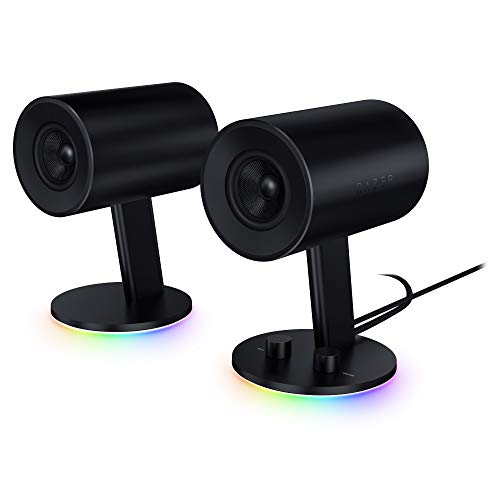
Above: Razer 2.0 Nommo Chroma – Amazon UK
In This Guide
What we look at when deciding which products are ‘good gaming speakers’
- Quality – Wow. As anyone who has had a few sets of PC speakers knows, they’re not exactly created equally. There’s some absolute monster speakers out there (in a good way) and some god-awful quality speakers that you’ll be sending back quicker than you can quick-scope a newb on boxing day.
- Feedback & other reviews – How are other buyers liking this gaming audio system?
- How loud does it go? – While your other half, or family members, might not thank you for it, you definitely want a set of PC speaker that are at least capable of melting your face off. Even if it’s just for those times when you’ve got the place to yourself!
#1 Creative Sound Blaster X Katana
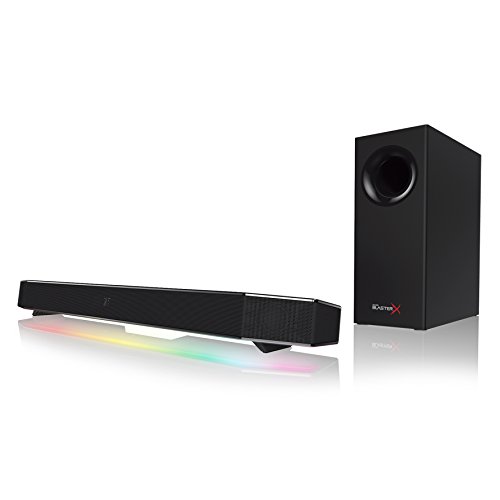
Built in lighting?: Yes
Separate Subwoofer: Yes
This might be the gaming sound bar you’re looking for
The Creative Sound Blaster X Katana is a gaming sound bar from the good folks at Creative. It sits under your monitor and has a very compact profile. Despite this, and partly thanks to the 5.25″ subwoofer, it has a whopping volume and really deep bass.
be careful with the volume. Unlike a lot of gaming audio, it really is deafening when cranked right up!
Who’s shooting me?
Although not technically a surround sound system, the X Katana is eerily good at creating a 3D effect on gaming audio that lets you hear where sounds are coming from. It really shines in terms of the level of detail of the audio and the deep, rumbling bass that’s ideal for gaming.
And be careful with the volume. Unlike a lot of gaming audio, it really is deafening when cranked right up!
Connection-wise there’s both USB and optical. And, although there’s no optical cable in the box, they have included mounting brackets (in the kit) for anyone wanting to wall mount this soundbar.
As for the subwoofer, it’s a stiff paper cone woofer, encased in a solid MDF cabinet. While it’s not much to look at, it does a great job and can be hidden under your desk somewhere!
Bluetooth can be used if you want to use this gaming audio as a speaker to play your tunes, or even for mobile gaming. There’s also 48 LED lights which are capable of 16.8 million colours. It’s up to you whether or not you think this is gimmicky. All we’ll say is – they’re there if you want to use them. But don’t let them take away from the fact that the X Katana has ridiculously good sound.
Verdict: If you’re looking for some seriously good gaming audio, and don’t mind paying a bit extra for it, the X Katana is a dream come true. It sounds amazing, especially with that big woofer, and has exceptional quality audio for music, shooting or ambient parts of your games. Top Stuff!
- Lovely deep bass thanks to that subwoofer
- Pinpoint accuracy on where sounds originate
- Sturdy and well made
- Compact size fits anywhere
- Comes with wall mounting brackets
- Oodles of volume!
- Remote a bit light and plasticky
- Not the cheapest desktop audio
#2 Razer Nommo Chroma
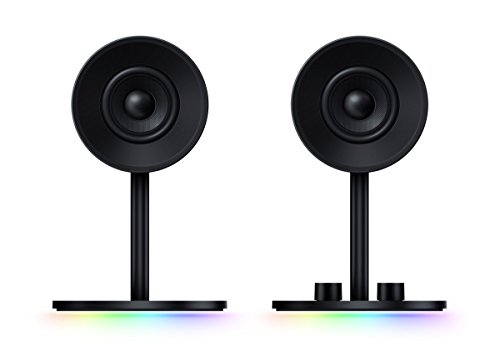
The Razer Nommo Chroma (Amazon UK) have a distinctive look, with the woofers hidden at the rear
Built in lighting?: No
Channel: 2.0
Stylish speakers with excellent sound quality
Whether or not you’re buying the Razer Nommo Chroma’s to compliment your other Razer gear, they’re a stylish stereo speaker with a good quality sound for gaming, movies and music. The bass units are built in to the speakers and face towards the rear. While it definitely can’t match dedicated subwoofers, it does a decent job.
Other parts of the sound are rendered perfectly, with mid and top end sound awesome. It’s a shame there isn’t a separate subwoofer, as this would have sounded truly amazing. The speakers themselves are well made, with Kevlar coating on the drivers. Razer’s drivers (the speaker kind!) are top quality.
Like any good set of gaming speakers, Razer’s 2.0’s feature some of the best positional audio you can get from forward facing speakers. You’ll be able to pinpoint a newb from 100 paces before they know what’s hit them.
The Chroma also look amazing and have a distinct stylish Razor design. There’s simple controls on the front for bass and volume. And you’re getting a pair of USB speakers here that are super-easy to set up.
Verdict: Razer’s beautiful USB speakers do a great job in the sound department. While the bass is good, it can’t compete with systems with a separate sub-woofer but the volume packs a punch and everything else about them is a definite win.
- Stylish design looks good
- Compact and good for limited spaces
- Sound quality is excellent on mid and top end
- Plenty of volume and power
- Well made
- Good quality, long cables
- Lacks that deep bass
- No tilt on speaker heads
Compare prices on the Razer Nommo Chroma speakers
#3 Logitech G560

Built in lighting?: Yes
Channel: 2.1
About this gaming sound system
Here’s something pretty awesome…
The g560 – a pair of great-sounding desktop speakers for gaming that have something called LightSync. This is a system that detects the action on screen, and throws lighting onto the wall behind the monitor that matches the action on screen.
this isn’t the kind of system that will need to be cranked up past more than half way
So if you’re running through a lush grassy area of Fortnite, the background will reflect that. Similarly, explosions and other effects will be dynamically shown!
As for sound quality, the G560 has it in spades. The (massive) sub-woofer has a ton of power to it and enough to shake the house, if you’re up for it. But it can also be separately controlled. Elsewhere the rest of the sound has the wow factor and will definitely be a big upgrade if you’ve got some old speakers ready to be replaced.
3D positional audio gives a headphone-like effect where you can hear where people are and get a sense of the sounds going on around you. The volume has plenty of power too, and this isn’t the kind of system that will need to be cranked up past more than half way, unless everyone lese goes out of the house!
Build quality is excellent and everything from the subwoofer to the other speakers is made from what feels like very high quality stuff. A lot of thought has gone into the design – you’ll likely want to keep these speakers on show. (Although the remote that comes with them doesn’t maintain this standard of design).
Verdict: An all-round top notch pair of desktop speakers for gaming, movies and music. The lighting effects work really well and are an interesting addition (If you like the sound of it!) Overall quality is impressive. Definitely recommended.
- Sound quality is great
- The subwoofer is a beast
- 3D positional audio works well
- RGB lighting effects are awesome
- Easy to set up
- USB, 3.5mm and Bluetooth inputs
- No HDMI or optical input
- Remote control doesn’t match up to rest of package
Compare prices on the Logitech G560
#4 Trust Gaming GXT 629 Tytan (RGB version)

Built in lighting?: Yes
Channel: 2.1
Good budget priced speakers for gaming
If you’re looking for a good quality sound from your PC or console gaming, but don’t want to fork out a huge amount of cash, the Trust GXT speakers might just be worth a look. There’s actually a whole range of different flavors in this range, which features a large powerful subwoofer and satellite speakers.
The GXT 629 is a 2.1 channel system that comes with a colour changing woofer that can be set to a specific colour, or allowed to rotate through them. The sound quality is really good for the price (usually found well South of the £100 mark). And volume has plenty of power in it thanks to the 120w (60RMS) speakers.
If you’re looking for a set of gaming speakers that has plenty of power, if and when you need it, you’ll like the Trust budget set. They have plenty of power sound just as good at loud or quiet settings. They’re pretty versatile too, and are a good choice if you want to listen to music or watch movies as well as some gaming sessions.
The only thing to watch out for is the remote is a bit on the cheap-looking side of things, but it’s still usable and lets you mess around with the lighting and adjust bass.
Verdict: This set of speakers are great value for money. They sound good and don’t cost the earth. Whether you’re gaming or watching movies, the audio quality is spot on for the price.
- Great value for money
- Deep bass
- Plenty of volume when you need it
- Cool design will compliment any setup
- Good quality sound on voice, music and gaming
- Remote is a bit flimsy
- Speaker cables come very tightly folded
Compare prices on the GXT 629
2.0, 2.1 or 5.1: which is best for gaming?
- 2.0 (a stereo pair) is compact and gives clean, accurate sound, but bass is limited without a subwoofer. Best for small desks and where space is tight.
- 2.1 (a stereo pair plus subwoofer) adds real bass and is the best choice for most gamers. The sub carries explosions and engine noise, letting the small speakers focus on clear mids and highs.
- 5.1 surround uses five speakers and a sub to place sounds around you. It can be impressive in games that support it, but needs space and cabling, and setup is fiddlier. On a desk, a good 2.1 system with positional processing is usually more practical.
A soundbar like the Katana sits between the two, giving a wide, detailed soundstage from a single compact unit, and it’s why bars work so well for desk use.
Speakers or headphones for gaming?
Both have their place. Headphones give the most accurate positional audio, keep noise in and out, and are the better choice for competitive games and late-night play. Speakers give a bigger, more natural sound, are more comfortable for long sessions, and are great for single-player games, movies and music. Many gamers use both: speakers for relaxed play, headphones for competitive matches. If you want a headset, see our review of the best Audio Technica gaming headset.
Which connection should you use?
- USB is the simplest. It carries digital audio to the speakers’ built-in converter and often powers the lighting and controls. Works with PC, Mac and most consoles.
- Optical (TOSLINK) is a good digital option for consoles and PCs with an optical output. It’s immune to electrical noise, but has no volume control, so use the speakers’ own controls.
- 3.5mm analogue works with almost any device, including phones and consoles. Quality depends on the sound card, and cheap ports can pick up hum and interference.
- Bluetooth is convenient for phones and tablets, but adds a small delay that’s noticeable in fast games. Use a wired connection for gaming and keep Bluetooth for music.
Using gaming speakers with a console
Most desktop speakers work with a PlayStation or Xbox, but only if they have a compatible input. Optical or 3.5mm from the controller (or through your monitor’s audio output) are the most common routes, and USB works on some models with certain consoles. Check the product listing for console compatibility before buying, particularly if you plan to use both a PC and a console on the same speakers.
Getting the best sound at your desk
- Put the speakers at ear height, angled towards you, roughly an arm’s length or more from your head. Stands or foam pads help if your monitor is in the way.
- Form a triangle. The speakers and your head should form a rough equilateral triangle for the best stereo image.
- Place the subwoofer on the floor, under the desk or beside it. Don’t put it against a wall or in a corner unless bass sounds thin, as it can turn boomy.
- Keep speakers a little away from the monitor sides so sound isn’t blocked by the screen.
- Isolate the speakers from the desk. Small foam pads stop bass vibrating the desk surface and muddying the sound.
- Keep cables tidy and separate. Run power cables away from audio cables to avoid hum.
Windows and game audio settings worth checking
- Set your speakers as the default playback device in Windows Sound settings.
- Set the format to 24 bit and 48000 Hz (or match the speakers’ recommended setting) for the cleanest signal.
- Try turning off “audio enhancements” if the sound seems processed or harsh.
- Choose the right speaker configuration (stereo for a 2.0 or 2.1 system) rather than 5.1, which can leave sound coming from speakers that don’t exist.
- Use in-game audio options like “speakers” mode, rather than “headphones”, which is designed for headphones.
- If the volume is very quiet and you’re raising it all the way, check the hardware volume knob too. Both should be set moderately.
Fixing hum and buzz
Hum and buzz are usually electrical interference. Try a different USB port (ideally at the back of the PC), separate the audio cable from power cables, and plug the PC and speakers into the same power strip. If you hear hiss when nothing is playing, lower the source volume in Windows and raise it on the speakers. A USB connection or optical cable is often the cleanest fix.
Protecting your hearing
Gaming audio can be very dynamic, with quiet sections followed by loud explosions. Set the volume so quiet dialogue is comfortable, and you won’t be blasted by loud effects. If you need it so loud that you can’t hear someone talking beside you, it’s too loud. Take breaks from long sessions too.
PC Sound System – BUYER’S GUIDE
Is it worth the expense for a new set of PC speakers?
Yes. Audio is half of a game’s atmosphere, and the small speakers that come with most monitors or laptops have almost no bass and very little detail. A decent 2.1 system or gaming soundbar is one of the most noticeable upgrades you can make, and a good set lasts through several PC upgrades.
Speaker systems with lighting
Some gaming speakers come with lighting effects, like the Logitech G560, which actually matches lighting it projects to what’s going on on screen.
Quickfire tips to getting the best desktop speakers for gaming
- Wooden subwoofers for deep, rich sound. You’ll definitely want a system with a decent subwoofer. Look for one with a wooden cabinet for better sound quuality!
- Optical input for better sound quality – Want the absolute best sound quality from your sexy new gaming speakers? Look for a set with an optical input.
Do I need a sound card for gaming speakers?
Not usually. USB speakers have their own built-in converter, and modern motherboards have decent audio outputs. A separate sound card is only worth considering if you use analogue connections and hear noise or hiss.
What does RMS mean, and how much power do I need?
RMS is the continuous power a speaker can deliver, and it’s a better guide than “peak” numbers. For a desk, 20 to 60 watts RMS is plenty, and more than you’ll use unless you like very loud volumes.
Are RGB lights worth it?
They don’t affect sound, so it’s a matter of taste. Screen-synced lighting like the G560’s is genuinely fun, but if you don’t want it, look for speakers that let you turn lighting off completely.