Bringing high quality audio to your home has never been easier thanks to the latest generation of wireless speakers that use Bluetooth and your home WiFi to connect. Walk into your kitchen and tell Alexa to play a song you want to hear. Take a bath listening to your latest favorite album, without worrying about knocking the phone in the bath!
This guide will go over everything you need to get your home set up with sweet, sweet audio in every room (or whichever rooms you want!) And cover the best multiroom speakers you should be looking at in 2026. Let’s get started!
Quick answer: the Audio Pro Addon C5 is the best sounding, the Sonos One is the easiest and most complete system to build on, and the Jam Symphony is the cheapest way to get started with multiroom. If you already use Alexa, Apple AirPlay or Google, check which system works with what you own, because that matters as much as the speaker.
In This Guide
What we look at when picking the best multiroom speakers
- Quality – Is this a serious product or some cheap, flimsy ‘plasticky’ junk? (There’s plenty of BOTH!) Is it a known brand name with some history behind it? We look at construction materials and whether or not stuff is just built to last!
- Feedback & other reviews – How are other buyers finding this audio system? What don’t buyer’s like?
- Ease of use – With home audio getting less geeky every day, we know not everyone out there is an audiophile. A good wireless multi-room audio system should be easy to setup and easy to use.
- How’s stable and reliable is the network? A complicated way of saying ‘will the speakers talk to each other?!’ The whole point is that this thing just works. There’s no fun in a multi room speaker system that constantly needs resetting or re-connecting!
What are the best multi room speakers?
There’s some amazing products available to make multiroom audio the joy it should be. If you want to jump to the best of the best when it comes to getting your tunes to play in different rooms, here’s the quick links to the best gear we’ve found so far.
Grab any of these speakers and you won’t go wrong.
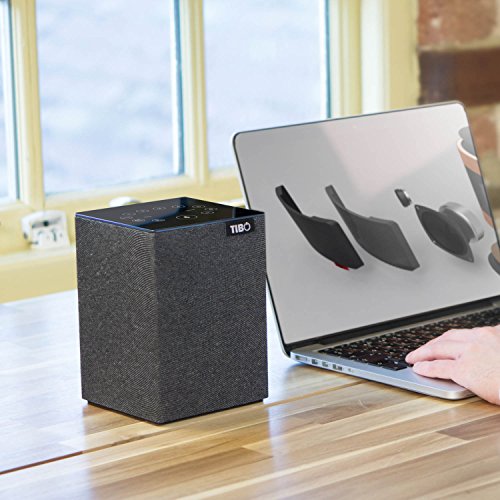
Above: TIBO Choros Tap – Amazon UK
#1 Audio Pro Addon C5
About this multi-room speaker system
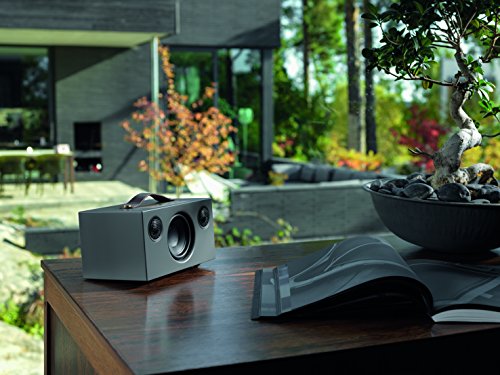
The best multi room audio system in 2026, for our money at least, is the Audio Pro Addon C5. This multi-room compatible wireless speaker has racked up a lot of prestigious awards, including What HiFi best product of the year. This multi-room system is best known for it’s top level audio and beautiful expression of tone.
The C5 is extremely simple to setup and supports any modern streaming service such as Spotify, Apple Air play and Amazon. You can also use your voice to control these wireless speakers thanks to Alexa!
The Scandinavian design is also really unqie, with a luxurious textured covering and polished ‘gold’ aluminium control panel. A leather handle completes the design (and makes it easy to carry around too, of course!)
The C5 wireless speakers are designed to be simple to use. You connect them to your home WiFi and that lets you access anything from MP3s, to radio stations, to favourite playlists. A simple one-touch favourites button does all the hard work.
Setting up the Addon to do multi-room audio is handles with the free Audio Pro Control app and gives you control over the audio if any room you put one of the C5 speakers in. As a stand-alone Bluetooth speaker, the C5 is a joy. As part of a multi-room system, it’s simply incredible.
- Cool Scandinavian design (in 4 nifty colours)
- Simple to setup and use
- One app controls all rooms
- Incredible sound reproduction
- Use voice control with Alexa
- Unique ‘Blocky’ design won’t be to everyone’s taste
- Not as compact as the Sonos One
Verdict: These uniquely-designed multiroom speakers look fantastic, work exactly like the should and offer unbeatable sound quality. If you like the design (not everyone will!) then you really can’t beat these. Both Amazon reviews and What HiFi agree with us – this is the best speaker for multi room use.
Compare prices on the Audio Pro Addon C5
#2 Sonos One

About this multi-room speaker system
The Sonos One (2nd generation) is a super-sturdy (nice and heavy) wireless speaker that’s been designed with multi-room use in mind. They connect together through your WiFi and the sound quality is seriously good. Expect gorgeous, detailed sound with plenty of volume. It’s a refined, well balanced speaker that suits kitchens, bedrooms and living rooms equally well.
Design wise, the Sonos One comes in either white or black and while it won’t win any awards for most innovative wireless smart speaker 2026, the compact size means you’ll have no problems finding somewhere for each speaker to go. Whether you’ve got a bit of space on a shelf, or want to tuck it away in your home office, the Sonos multi-room speakers should fit whatever space you have.
As we mentioned, the sound quality is extremely good – Sonos have had plenty of experience with smart wireless speakers – thanks in part to the Class-D amplifiers. You can control the action with Air play, the free downloadable Andriod / iOS app, or with you voice. These multi-rooms come with Alexa and it works pretty well here, although not as zippy as on Amazon’s own speakers.
This is also a good choice of speaker if you’re looking for a decent speaker to go in the bathroom. The Sonos multis are resistant to humidity and can be left indefinitely on a shelf in the bathroom, without and corrosion.
Verdict: You definitely can’t go wrong with these smart wireless speakers from Sonos. Sound quality, features and reliability combine to offer an easy-to-use speaker for multi-room use.
This Multiroom speaker Plays Music From
- Has a nice heavy, tough feel to it
- Looks slick wherever you put it
- A breeze to setup
- Sound quality second to none
- Google assistant not 100% reliable
- Alexa slightly slower than on the Amazon Echo
Compare prices on the Sonos One
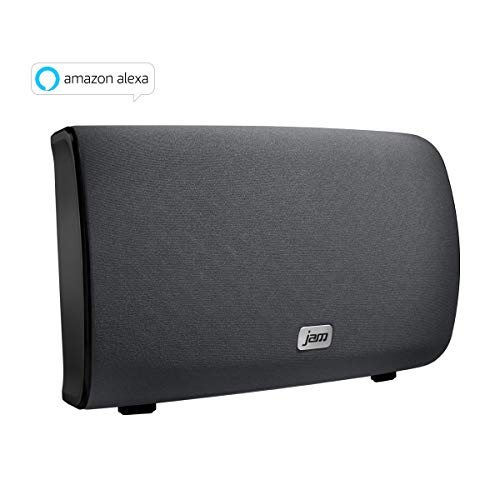
#3 Jam Audio Symphony Wireless Wi-Fi Speake
Ideal for room size: Small to medium
# Of speakers you can link: Up to 8
About this multi-room speaker system
If you’re looking for a decent cheap multi-room speaker to bring a little sound to your home, have a look at Jam Audio’s Symphony speaker. It’s a wireless speaker that can be connected to other Jam’s via your WiFi.
Once set up, you can enjoy different tunes in each room wirelessly, or play the same music throughout your house. This is a good budget priced wireless speaker offering decent sound quality without costing a lot of money.
If you’re looking for something you can set and forget, the Jam Symphony ticks that box. Once set up, you can use the free Jam App to control what plays where, volumes in each room and a other important stuff.
There’s also a very handy intercom built in so you can pass on important messages like ‘TEA’S READY!’ to household members.
This Multiroom speaker Plays Music From
The Jam symphony wireless multi-room speaker works with Spotify, iHeartRadio, TuneIn, Tidal and more.
- Good quality sound for price
- Cheap wireless multi-room speaker
- Volume can go high enough for a party
- Setup is really easy
- Smart, clean design
- Sound quality lacks depth of Sonos
- App is a bit ‘clunky’, but usable
Compare prices on the Jam Symphony
How multiroom audio actually works
A multiroom system is a group of speakers connected to your home Wi-Fi (or a network they build themselves), each of which fetches its own music stream from the internet or from your library. A free app on your phone tells each speaker what to play. Because each speaker streams on its own, your phone isn’t relaying the audio, so calls, notifications and leaving the house won’t interrupt the music. You can play the same track in every room in perfect sync, or a different one in each room.
Choosing a system: which ecosystem?
Speakers only work together if they speak the same language, so pick an ecosystem first.
- Sonos – the most complete and polished, with a huge range from portable speakers to soundbars, and a solid app that works with most streaming services.
- Audio Pro, Bluesound, Denon HEOS and similar – dedicated multiroom systems with their own apps. Often better value or better sound, but with a smaller range and different app quality.
- Apple AirPlay 2 – lets you play to several compatible speakers from an iPhone, iPad or Mac. Compatible speakers come from many brands.
- Google Cast – the same idea for Android and Chromecast-built-in speakers.
- Amazon Alexa multi-room – Echo speakers and compatible third-party speakers can be grouped by voice, which is a cheap way to get started.
Mixing brands is possible when speakers support a shared standard like AirPlay 2, but a single ecosystem is more reliable and easier to control from one app.
Get your Wi-Fi ready first
The single most common reason multiroom systems misbehave is weak Wi-Fi.
- Check coverage. Every speaker needs a decent signal. If your router sits in a corner, distant rooms may be marginal.
- Consider a mesh Wi-Fi system for larger or older homes, with nodes that spread the signal evenly. Many mesh systems can be wired together for even better reliability.
- Keep the router central and up high, not tucked behind a TV or in a cupboard.
- Use a 2.4GHz and 5GHz network correctly. Most speakers work on both, but a name that appears twice (one for each band) can confuse setup. Follow the app’s instructions.
- Give the speakers a fixed place. Moving a speaker to a new room is fine, but it’s worth checking signal strength there.
Choosing speakers for each room
- Kitchen: a mid-sized speaker with voice control, well away from steam and splashes. Kitchens are noisy, so pick something with a bit of power.
- Living room: your best speakers, or a pair in stereo. Consider a soundbar that joins the system, so TV sound and music share one setup.
- Bedroom: a smaller speaker that sounds clear at low volume. Voice control and a sleep timer are handy.
- Bathroom: choose a humidity-resistant speaker, and keep it out of direct splashes. Ordinary speakers can be damaged by steam.
- Home office: a compact speaker for background music, positioned at the side of your desk rather than behind the monitor.
- Garden or patio: use an outdoor-rated speaker. See our guide to garden rock speakers.
Stereo pairs and surround
Two identical speakers can usually be paired for true stereo, with one as the left channel and the other as the right. This is far better than two separate speakers playing the same mono signal, and it’s the best upgrade for a living room. Some systems also let you combine a soundbar with two rear speakers for a genuine surround setup. For a traditional, fixed alternative, see our all-in-one home cinema guide.
Starting small and building up
You don’t need to buy a whole house of speakers at once. Start with one speaker in the room you use most, try the app, and add a second when you’re comfortable. Keep an eye out for bundles and seasonal sales, and stick with one ecosystem so each addition slots in easily.
Troubleshooting common problems
- Speaker won’t set up: check your phone is on the same Wi-Fi network, and that the speaker is in setup mode. Restart the router if needed.
- Music cuts out: usually a weak Wi-Fi signal. Move the speaker or improve the coverage.
- Speakers out of sync: re-group them in the app, or restart the speakers. Wired connections are the most reliable option for the main speaker in the group.
- Voice assistant not hearing you: keep the speaker away from TVs and walls, and check that the microphone isn’t muted.
- App can’t find a speaker: restart the app and the speaker, and check any firewall or router setting that blocks device-to-device traffic.
Multi-room speakers – BUYER’S GUIDE
What IS a multiroom audio system?
Multiroom audio isn’t anything new. But it’s had a huge resurgence thanks to new, good quality wireless speakers. There are companies, such as Sonos who specialise in multi room speaker setups, but many wireless speakers can be connected wirelessly to form a multi room audio system.
5 awesome things you can do with multiroom wireless speakers
Not sure if it’s worth the hassle setting up your own home audio system? Check out these things you’ll be able to do:
- Control your music with your voice! Think the Amazon devices have the monopoly on voice control? Most good wireless speaker should be able to let you setup Alexa and use it to control your tunes. Cool.
- Have the perfect house party – Get perfect audio in every room (or at least the ones with people in!) And you can always turn it off when it’s kicking out time.
- Stream your favourite services – If you’ve got an existing music service, use your WiFi to stream any song your like onto your wireless speakers.
- Play different songs in every room – Create a different mood in every room, or let everyone pick their own songs.
- Start small and grow with time – Most people start with one speaker and expand with a second. But be warned it’s addictive.
What’s it do?
Once you’ve got your speakers set where you want them (and this doesn’t need to be anything complicated – shove ’em on a shelf if you’re not a fan of DIY). You then download the app from the manufacture from Play store or iOS (for iPhone) and can then control your sexy new home audio system from anywhere.
You can even use your own voice, if your wireless home speakers support something like Alexa.
What kinds of things can you play on a multi-room Bluetooth system?
Pretty much anything! Is the sort answer. If you can play it on your phone, you can get it playing through your wireless multi-room system too.
- Streaming services – If you’re reading this, you’ve probably already discovered the joys of streaming music services like Spotify, Amazon Music and Apple music (to name but a few). If you haven’t, they’re a great way to get old and new tracks in your new multi room speaker system.
- Internet radio and podcasts – most systems include services like TuneIn for radio stations from all over the world, plus podcasts.
- Your own music – you can play MP3s and other files stored on your phone, computer or a network drive, depending on the system.
- TV sound – some systems (Sonos in particular) let you add a soundbar that plays your TV audio, and you can group it with other rooms.
Picking the right number of speakers
How many speakers do you actually need?
Technically, you can buy one wireless speaker and play music through it like that, but that’s not going to set the world on fire. For the best wireless multi room audio, you’re going to have to need more than one.
Putting a wireless speaker in the bathroom
There’s nothing like unwinding after a long day in the bath, or shower, while chilling out to that special track. So extending your multiroom system into the bathroom makes a lot of sense. (No more worries about dropping your phone in the bath!)
One thing to look out for, if you’re looking for a wireless multiroom speaker for your bathroom is to check if it’s humidity resistant. Ruining an expensive bit of audio equipment just because it didn’t like a bit of steam isn’t a lot of fun. Check out something like the Sonos One – it’s humidity-resistant and fine for use in bathrooms.
Getting the wireless speakers connected
Long gone are the days of having to come up with ways to hide cables. It’s all done wirelessly today (thankfully!) This makes life a bit easier when it comes to installing your home’s multiroom system.
All you have to worry about now is getting your speakers to talk to each other. This is normally done in one of two ways, each with pros and cons.
- Bluetooth – simple and needs no Wi-Fi, but range is short and most Bluetooth speakers can only play from one device at a time. Better for a single speaker or a pair than a whole-house system.
- Your home Wi-Fi – this is what real multiroom systems use. It gives longer range, better sound quality and lets each speaker stream independently, so your phone can be switched off or leave the house without stopping the music. It relies on a good Wi-Fi network.
- COOL FACT – you might not have to buy all the same brand of wireless multi-room speakers to get them to work together. Many speakers are cross-compatible. But check to make sure before you buy!