If you’ve not yet discovered the sheer unadulterated joy of owning a home cinema system then it’s time to stop missing out. There’s some superb all-in-one ‘kits’ out there that take the hard work out of it and just need to be setup at home.
This guide will take you through some of the best (and more affordable) home cinema systems on the market in 2026 and show you some of the things we like and didn’t like about them.
Strap in for a new experience in home cinema and lets dive in.
Good to know: the systems below have been on sale for a few years, so stock and pricing change. If a model is no longer available, the advice on speakers, connections and setup still applies to any similar all-in-one system, and the same brands (Sony, LG, Samsung, Panasonic) keep updating their ranges.
TL;DR Version: The Sony BDV-E4100 is currently our favourite budget all-in-one home theatre system. It has everything you need in the box to bring surround sound to your home movie nights, gaming sessions or just listening to music. See it on Amazon
#1 Sony BDV-E4100 Home Cinema System
What are you buying?
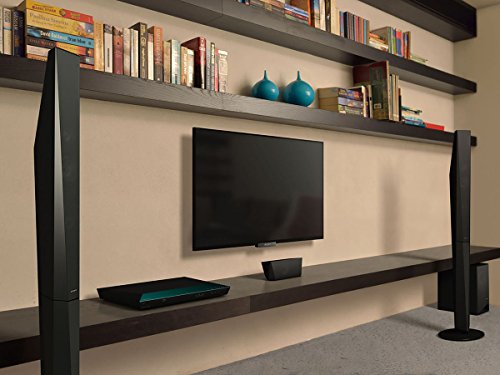
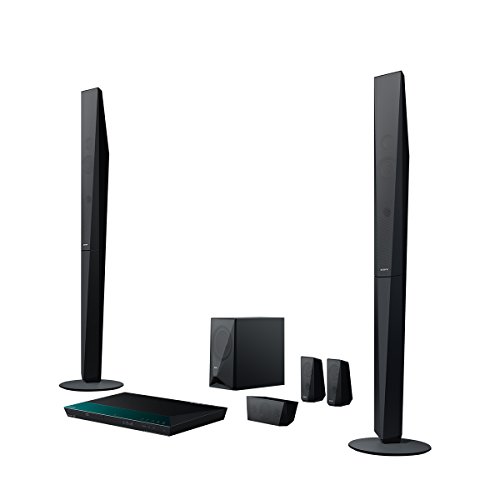
This is an all-in-one 5.1 home cinema system that comes with everything you need to set up a high quality surround sound cinema experience. All without having to book a single ticket. The amplifier, blu-ray player and surround speakers are all in this bundle.
The system comes with two front, ‘tall’ speakers, two that go behind the viewers and a subwoofer that you’ll hide away on the floor somewhere. As you probably know, this is the bit that’s responsible for the deep ‘bassy’ sound. The amplifier is tucked away neatly in the blu-ray player in case, like us, you were wondering.
This is a very versatile system that’s suited to both larger and smaller rooms.
But is Sony’s budget-priced home cinema actually any good?!
What kind of sound quality are we talking here?
If we had to put it into two words, they’d probably be: Surprising and Amazing! It’s deep. It’s loud, and it feels powerful. Whether you’re watching a movie or listening to a CD, the sound quality here is impressive, especially considering this isn’t the most expensive all-in-ones on the market.
Sony have done a good job with this theatre system. Good, clean and detailed sound.
Setting up is (fairly!) easy…
We say fairly because – as is often the case – the instructions aren’t especially well laid out. Having said that, even if you’ve never set up a home cinema before, you should be able to see where it all fits together. The only ‘hard’ work is deciding where to put your speakers.
Cheat hint: have a look on YouTube for a setup video and you won’t have to read the guide at all. 🙂
What we like about this all-in-one!
Plenty of cable – The included 10m cable for the rear surround sound speakers makes life a bit easier when you’re setting them up.
Home theatre interface looks good and is easy to use – The on-screen menus are well laid out and looks clean and modern. It’s also smooth and lag-free.
Design looks good – Good to see Sony have made at least some effort to style the theatre and make it look a bit unique. The speakers have a cool ‘tapered’ design and even the main box is styled well.
Good value for money – Sony’s budget home cinema system is punching above it’s weight sound-wise, and offers a good bit system for the money. It’s also good you’re getting a well-known ‘brand’ for the cash.
Connect Bluetooth easily – another feature many will like is the ability to play pretty much anything over Bluetooth. You can play your music direct from your smart phone. The Bluetooth connection is stable and easy to set up, and tunes sound totally different though the surround system.
What isn’t so good about this home cinema system?
Front LED too dim – One thing that’s could be improved is the LED display on the front of the player. It’s a bit dim and can be hard to read. While it won’t bother many, it’s still worth mentioning.
‘Ping’ when un-pausing gets old fast – There might be a way to turn this off, but you’ll hear an intentional ‘ping’ noise when you pause or un-pause a movie. Nit-picking? Maybe, but it’s best to mention these things!
This home cinema features
- Full HD blu-ray player
- Bluetooth playback
- 2 x tall speakers
- 2 x compact speakers
- subwoofer
- Built in WiFi
Verdict: If you want an all-in-one system that brings cinema quality sound to your living room at a sensible budget, this is the one to go for. It’s easy to set up, sounds amazingly good and doesn’t cost the earth.
- Fantastic sound on everything from explosions to classic music!
- Good value for money
- Ideal for any size room
- Has everything you need in one box
- Impressive design
- Well known brand
- Ping noise bit irritating
- Setup instructions not as good as youtube!
#2 LG LOUDR LHB645N
About this home theater system
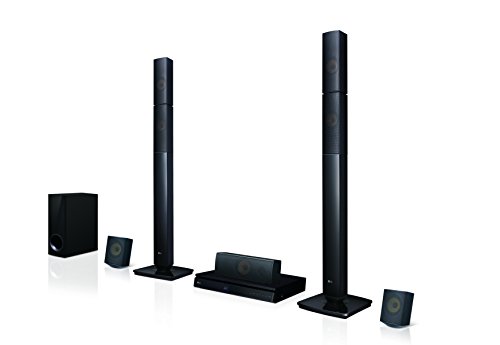
Like the Sony one above, this is an all-in-one home theatre system that comes with everything you need, including a blu-ray player, capable of playing 3D Blu-ray discs. (You’ll need a compatible TV for that feature to work). Let’s find out why this system, from LG, might be one for you.
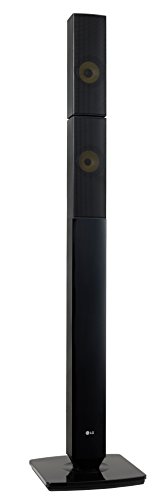
How’s it sound?
The sound quality on offer here really is impressive. The bass is deep, whether you’re playing games, using it for home cinema or TV. Voices are especially crisp with LGs surround sound system, and the sound is detailed and well-balanced.
Another cool little innovation with this home theatre is ‘Private Sound Mode‘ – a handy system that sends sound BACK to your phone or tablet. This uses your WiFi and is great for some late night viewing after it’s quiet o’clock at your place.
Getting it set up
Setup is actually not bad at all with the LG LHB645N. There’s not much you need to do to get up and running. The speakers are wired and it’s just a case of positioning them and following the instructions. The remote itself is well designed and easy to use.
You definitely do NOT need to be technically-minded to get this theatre system up and running.
What we like about this all-in-one
Bluetooth connection to your phone – If you’re looking for a good way to play music through a surround system, it’s easy to do here and, as mentioned above, the sound quality is cracking for this price.
Great value for money – Depending on where you get this, and if you find a sale, you’ll likely pay under £300 for it, which is a decent price for a good all-in-one system, especially with a 3D blu-ray player.
Looks good – There’s something neat and stylish about the LG LHB645. The speakers are well designed and definitely look good next to the TV.
Bluetooth is simple and reliable – So far no dropped connections or weird goings on. Bluetooth works exactly as it should on this all-in-one home cinema. You can stream from a wide variety of sources such as – Spotify, Amazon music etc. No probs here.
What wasn’t so hot?
It’s not all roses in this LG budget home theater’s garden though. Here’s what we didn’t like so much with this audio system.
Playback from USB sticks is not 100% perfect – some pauses and stutters in the video quality. Perhaps this might get fixed with a firmware patch, but there were a few blips.
This home cinema features
- 5.1 Ch 1000w System
- Two tall boy speakers
- 2 satellite speakers
- 3D Blu-Ray playback
Verdict: LG’s home theatre is definitely worth the money and offers a lot for under £300. If you have the TV to play them, you can also enjoy some 3D blu-ray action, along with the Cinema quality sound.
- Crisp sound quality
- Easy to set up
- Everything in one box
- Well designed speakers
- 3D Blu-ray player
- Playback from USB clunky
Understanding 5.1 surround sound
The “5.1” in most all-in-one systems describes the speakers: five main channels and one subwoofer (“the .1”).
- Front left and right carry most of the music and effects.
- Centre is dedicated to dialogue, so voices stay clear and locked to the picture.
- Rear left and right (surrounds) create the sense of being in the middle of the action, with effects moving around you.
- Subwoofer handles the low bass and rumble.
Some cheaper kits use a “2.1” arrangement (two speakers and a sub) or have the front pair also handle the centre channel. The systems above are true 5.1 arrangements with a wider soundstage than a soundbar.
How to position your speakers
Correct placement makes more difference to surround sound than the price of the kit.
- Front speakers: either side of the TV, angled slightly inwards, with the tweeters roughly at ear height when you’re seated.
- Centre speaker: directly above or below the TV, facing you. If your kit has no centre speaker, the front pair handle dialogue.
- Surround speakers: slightly behind and to the sides of your seat, around ear height or a little above. Wall brackets or shelves work well. Avoid placing them on the floor, which muffles the sound.
- Subwoofer: on the floor, often near the front of the room. Try moving it around. Bass sounds different in every corner, and a few minutes of experimentation can transform it. Avoid tight corners if the bass sounds boomy.
Running the cables without tripping over them
Rear speakers are the awkward part. Run the cable around the edge of the room under the carpet edge, along the skirting board with cable clips, or through a cable cover. Never run cable across a doorway, and leave a little slack at each speaker. If your system includes a 10 metre rear cable, measure the route first, since you’ll need enough for the corners and the height. Some higher-priced models offer wireless rear speakers, which cut cable clutter, though the rears still need mains power.
Connecting your all-in-one system to your TV
- HDMI ARC: the simplest choice if both devices have an ARC socket. One HDMI cable brings TV sound to the system and lets one remote control the volume.
- Optical cable: works with almost every TV. Set the TV’s audio output to “external” or “optical”, and the system to its optical input.
- Via the Blu-ray player: if your all-in-one has HDMI inputs, connect your Sky box, console and other sources to it and send one HDMI to the TV.
Most streaming apps only send stereo sound unless you’re using a device that supports surround, so check your streaming box or TV’s audio settings, and set it to output surround where possible.
Setting the levels so it sounds right
After connecting everything, spend ten minutes calibrating.
- Run the system’s test tone from each speaker. Sit in your normal seat and make sure each speaker is working and in the right position.
- Adjust the level of each speaker so they sound about equally loud from your seat.
- Set the subwoofer level so that bass supports the sound, rather than dominating. If you can hear where the subwoofer is, it’s too loud.
- Set the distance for each speaker if the system asks for it, so the sound from all speakers reaches you together.
- Watch a familiar film scene and fine tune. If dialogue is hard to hear, raise the centre level.
Many systems also have an auto-calibration mic that does this for you. If yours does, use it, then adjust the results to taste.
Home cinema in a box or a soundbar?
A soundbar is simpler and neater, and it’s the right answer for most living rooms and for anyone who dislikes cables. A home cinema system gives you genuine surround, bigger dynamics and a Blu-ray player in the same box, but takes more space and effort. If you want to keep things simple, see our Bluetooth soundbar guide. If you have the space, and you enjoy films, an all-in-one system gives you far more sound for the money.
Upgrading later
The main limit of an all-in-one system is that the amplifier and speakers are tied together. If you outgrow the kit, the usual upgrade path is an AV receiver plus separate speakers. You can keep good pieces from your system (the subwoofer, for example) if they have standard connections, but check before you plan on it.
All-in-one home theatre systems – BUYER’S GUIDE
Meet your new home cinema system!
There’s a myth that home cinema audio is something complicated.
Don’t believe it.
It’s easy to get an all-in-one home cinema system up and running and the benefits are HUGE. so what are the different ‘bits’ that make it all work.
- The subwoofer – lets start with this unobtrusive box that’s incredibly important yet spends it’s time unceremoniously hidden away on the floor. The sub woofer handles the BASS part of the sound and is responsible for the huge booms in explosions and the deeper parts of music.
- Front left and right speakers – These are stereo speakers that sit either side of your TV and project outwards towards the viewer. They’re usually ‘tall’ speakers but not always.
- The rear speakers – smaller speakers that complete the setup and provide the surround part of the sound.
- The amplifier / blu-ray player – Depending what kind of kit you get, you’ll either have the amplifier / hub that makes it all work together. And it may have a blu-ray player built in.
5 things you’ll love with your all-in-one home cinema system
Love spending money on junk that never get used? Oddly enough, neither do we. So what makes the expense and hassle of getting a new home cinema system worth it? Here’s 5 things that will make it all worth it!
- Same movies, next level audio – love your movies? Your favourite ones won’t sound the same again. Even if you don’t want to buy the blu-ray version, they’ll still sound incredible thanks to the surround sound and the bass from the sub woofer.
- Sounds so much better than your TV’s built in speakers – If you’re upgrading from your TV standard sound then you’ll be surprised (shocked?) how much of a leap it is. You’ll hear things you’ve never heard before and voices will be clearer and way more crisp.
What’s this optical cable all about?
You might have heard mention of the optical connection while reading reviews. This is a way to connect certain devices to your home theatre system with a proper surround sound feature. These include
- TVs
- Sky Box
- Games consoles
Home cinema system FAQ
Do I need a Blu-ray player in my home cinema system?
It’s a nice extra, and it means fewer boxes. If you mainly stream, you can skip the disc player and put the money towards better speakers or a separate amplifier.
Can I use a home cinema system for music?
Yes. Most systems play CDs, USB and Bluetooth. Switch to a stereo mode for music, since surround modes can sound artificial with two-channel recordings.
What size room does a 5.1 system suit?
Most all-in-one systems work well in living rooms from small to large. In a very small room, keep the volume moderate and the subwoofer level low. In a very large or open plan room, you may want a more powerful separate receiver.
Will the rear speakers annoy my family?
They can if the cables are in the way. Plan the route, use cable covers or clips, and consider a system with wireless rears if you can’t run cables neatly.